Tkzzt Services

Loader & Guide

Everything you need to get your tool running, in one place. Downloads, setup, and fixes for the errors people run into most.

Work through the setup section once before you start. Most support tickets we get are one of the steps on this page being skipped.

If something still does not work after following the guide, open a ticket in our Discord. Include your order number and the exact error message you see.

Before you start

Required for every tool. Do these once, in this order.

Antivirus

Antivirus software blocks loaders. It has to be off while you use the tool, not just excluded.

Uninstall third-party antivirus
  1. Open Control Panel.Search for it in the Windows search bar.
  2. Open Programs and Features.
  3. Find your antivirus in the list.
  4. Right-click it and select Uninstall.
  5. Follow the prompts and give the permissions it asks for.
  6. Restart your PC if you are asked to.
Disable Windows Defender
  1. Download Defender Control and run it.Archive password: sordum
  2. Click Disable Windows Defender.
  3. Approve any prompt that appears.

OneDrive

Files inside OneDrive are synced and can be locked or removed while the tool runs. Move them out first.

Move a file out of OneDrive
  1. Open File Explorer.
  2. Click OneDrive in the left sidebar.
  3. Find the file you want to move.
  4. Drag it to a folder outside OneDrive and release.

Secure Boot

Turn Secure Boot off
  1. Restart your PC and press the key for BIOS or UEFI while it boots.Usually Del, F2, F10 or F12. It depends on the manufacturer.
  2. Go to the Security or Boot section.
  3. Set Secure Boot to Disabled.
  4. Save and exit, usually with F10.
  5. Your PC restarts with Secure Boot off.

Riot Vanguard

Valorant's anti-cheat runs at boot and blocks other tools. It has to be uninstalled, not just closed.

Uninstall Riot Vanguard
  1. Close Valorant and Vanguard.Right-click the tray icon at the bottom right and exit both.
  2. Uninstall Valorant if you want it gone as well.Control Panel, then Programs and Features.
  3. Right-click Start, open Apps and Features, find Vanguard and uninstall it.
  4. Restart your PC.

Prevent bans

Follow all three. Most bans come from one of them being ignored.

Three rules
  1. Do not use aimbot.You get reported when other players notice you. Play low key.
  2. Only use content that has been in the game since release.With unlock all, new content is marked as unsafe. Leave it alone.
  3. Follow every setup step exactly.A tool that injects wrong can get you banned.

Products

Download, setup, how to use it, and the errors that come with it. Work through the setup above first.

Ancient Products

Download loader

Disable your antivirus before you open the loader.

Setup

Overlay and audio setup

You need one of the two. SteelSeries works on both NVIDIA and AMD, the NVIDIA App only on NVIDIA and not in fullscreen.

SteelSeries GG (recommended)
  1. Install SteelSeries GG.
  2. Open Settings, go to GENERAL, then General.
  3. Enable Sonar.
  4. Go to SONAR, then Shortcuts.
  5. Bind F7 to Master, Volume Up.
  6. Press F7 once before you inject.
NVIDIA App or GeForce Experience
  1. Install the NVIDIA App or GeForce Experience.
  2. Open Settings, go to General.
  3. Enable In-Game Overlay.

System requirements

All of them, not some.

Your PC needs
  1. A CPU with AES support.
  2. SVM or VT-X enabled in BIOS.
  3. An Intel or AMD CPU.
  4. Windows 10 or 11, build 1809 to 24H2.
  5. 16 GB RAM.

How to use

  1. Open the loader.
  2. Enter your license key.
  3. Wait until the loader has fully loaded.
  4. Select your game and click inject.
  5. Wait until the loader closes by itself.
  6. Open the game.

Press Insert to open and hide the menu.

The overlay has to be enabled before you inject. Enable it with ALT+P. Your antivirus has to stay off.

Troubleshooting

Overlay and SteelSeries
  1. Open the NVIDIA App or GeForce Experience.
  2. Go to Settings and disable In-Game Overlay.
  3. Enable In-Game Overlay again.
  4. Try injecting again.
  1. Open SteelSeries GG.
  2. Make sure Sonar is enabled.
  3. Press your Sonar bind, ALT+P.
  4. Inject again.

The Sonar bind has to be pressed before you inject.

  1. Open SteelSeries GG.
  2. Go to Settings, then MOMENTS.
  3. Open Capture and Sound.
  4. Disable Allow Moments to capture while gaming.
  5. Restart the game.
System and BIOS

Intel RST has to be disabled.

  1. Convert your system disk to GPT.
  2. Switch the BIOS from Legacy to UEFI.

You can use mbr2gpt, which ships with Windows, or any disk management tool.

  1. Enter your BIOS.
  2. Enable one of these: Intel Virtualization Technology, Intel VT-X, AMD-V or SVM Mode.
  3. Save and restart.

Method 1

  1. Open Control Panel.
  2. Go to Programs, then Enable or Disable Windows Features.
  3. Disable Hyper-V and Virtual Machine Platform.
  4. Restart your PC.

Method 2

  1. Open Command Prompt as administrator.
  2. Run the command below.
  3. Restart your PC.
bcdedit /set hypervisorlaunchtype off

Windows 11, if it still fails: run PowerShell as administrator and paste all of these.

takeown /F "C:\Windows\System32\hvix64.exe"
icacls "C:\Windows\System32\hvix64.exe" /grant *$(([System.Security.Principal.WindowsIdentity]::GetCurrent()).User.Value):F
takeown /F "C:\Windows\System32\hvax64.exe"
icacls "C:\Windows\System32\hvax64.exe" /grant *$(([System.Security.Principal.WindowsIdentity]::GetCurrent()).User.Value):F
del "C:\Windows\System32\hvix64.exe"
del "C:\Windows\System32\hvax64.exe"

Restart your PC afterwards.

Loader and injection
  1. Inject again.
  2. If it still does not work, run the overlay as administrator.
  1. Download and install the Visual C++ Redistributable.
  2. Restart your PC.

Inject the loader again.

  1. Restart your PC.
  2. Try injecting again.

If it keeps happening, clean up your startup programs. Leftover drivers from old software cause this.

  1. Download Autoruns.
  2. Disable every startup entry that is not part of Windows.
  1. Disable all antivirus and protection software.
  2. Remove any anti-reader or security tools.
  3. Clean up your startup programs if it still fails.
Network
  1. Check your internet connection.
  2. Restart your router.
  3. Disable your VPN, or switch to a different server.
Software conflicts
  1. Uninstall Riot Vanguard and Faceit Anti-Cheat.
  2. Restart your PC.
  3. Try again.
Hardware

Your CPU does not support AES. This cannot be fixed. Open a ticket in our Discord for a refund.

Disable RAID in your BIOS. If that is not possible, turn off the spoofer and reinstall Windows.

On a desktop your graphics card is too old. On a laptop, disable the integrated graphics in BIOS. Open a ticket in our Discord for a refund.

  1. Open Command Prompt as administrator.
  2. Run both commands below.
  3. If either one fails, reinstall Windows and check again.
wmic diskdrive get Caption, SerialNumber
wmic baseboard get SerialNumber

Not listed? Check the setup again, restart your PC, then open a ticket in our Discord.

MW4 Tkzzt Chair

Modern Warfare 4

Download loader

How to use

  1. Download and start the loader.
  2. Enter your key and press Enter.
  3. Wait for it to load. When it is done, you are ready.
  4. Open your game and wait for the tool to load.

Press Pos1 or Insert to open and close the menu.

Troubleshooting

  1. Turn off Core Isolation.Open Windows Security, go to Device Security, and make sure Memory Integrity is off.
  2. Download the fix file and run it as administrator.
  3. Restart your PC.Use Restart, not Shut down. A full restart is needed for the changes to apply.
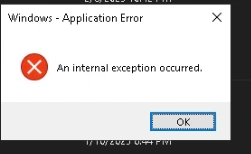
An internal exception occurred

Caused by network problems, outdated software or corrupted files.

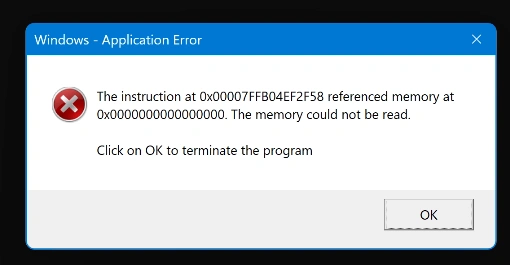
The memory could not be read
  1. Download the Visual C++ Redistributable.
  2. Open the file and follow the installer.
  3. Restart your PC.

Not listed? Check the setup again, restart your PC, then open a ticket in our Discord.

MW4/BO7/WZ Spoofer

Modern Warfare 4, Black Ops 7, Warzone

Download loader

How to use

  1. Download and start the loader.
  2. Enter your key and press Enter.
  3. When it has loaded, generate a new seed.
  4. Click Start Spoof.
  5. Once it is done, you are ready.

Troubleshooting

  1. Turn off Core Isolation.Open Windows Security, go to Device Security, and make sure Memory Integrity is off.
  2. Download the fix file and run it as administrator.
  3. Restart your PC.Use Restart, not Shut down. A full restart is needed for the changes to apply.
An internal exception occurred

Caused by network problems, outdated software or corrupted files.

The memory could not be read
  1. Download the Visual C++ Redistributable.
  2. Open the file and follow the installer.
  3. Restart your PC.

Not listed? Check the setup again, restart your PC, then open a ticket in our Discord.

BO7/WZ Tkzzt Chair

Black Ops 7, Warzone

Download loader

How to use

  1. Download and start the loader.
  2. Enter your key and press Enter.
  3. Wait for it to load. When it is done, you are ready.
  4. Open your game and wait for the tool to load.

Press Pos1 or Insert to open and close the menu.

Troubleshooting

  1. Turn off Core Isolation.Open Windows Security, go to Device Security, and make sure Memory Integrity is off.
  2. Download the fix file and run it as administrator.
  3. Restart your PC.Use Restart, not Shut down. A full restart is needed for the changes to apply.
An internal exception occurred

Caused by network problems, outdated software or corrupted files.

The memory could not be read
  1. Download the Visual C++ Redistributable.
  2. Open the file and follow the installer.
  3. Restart your PC.

Not listed? Check the setup again, restart your PC, then open a ticket in our Discord.

BO7/WZ Unlocker

Black Ops 7, Warzone

Download loader

Same download as the BO7/WZ Chair.

How to use

  1. Download and start the loader.
  2. Enter your key and press Enter.
  3. Wait for it to load. When it is done, you are ready.
  4. Open your game and wait for the tool to load.

Troubleshooting

  1. Turn off Core Isolation.Open Windows Security, go to Device Security, and make sure Memory Integrity is off.
  2. Download the fix file and run it as administrator.
  3. Restart your PC.Use Restart, not Shut down. A full restart is needed for the changes to apply.
An internal exception occurred

Caused by network problems, outdated software or corrupted files.

The memory could not be read
  1. Download the Visual C++ Redistributable.
  2. Open the file and follow the installer.
  3. Restart your PC.

Not listed? Check the setup again, restart your PC, then open a ticket in our Discord.

Meccha Chameleon Chair

Download loader

How to use

  1. Download and start the loader.
  2. Enter your key and press Enter.
  3. Wait for it to load. When it is done, you are ready.
  4. Open your game and wait for the tool to load.

R6 Crusader Chair

Rainbow Six Siege

Download loader

How to use

  1. Download the loader.
  2. Extract the archive into its own folder.Use a folder name in English letters. Your Downloads folder on the C drive works well.
  3. Right-click the loader and run it as administrator.
  4. Enter your key in the Serial Key field and click Sign In.
  5. Wait for the Rainbow Six Siege icon to appear.
  6. Click Start Injection Process.
  7. When you see Please Open Rainbow Six Siege, start the game.
  8. Press Insert from the main menu once the game has started.

Press Insert to show and hide the menu.

Support

Still stuck? Open a ticket. We answer there, not by email.

  1. Join our Discord and open a ticket.
  2. Include your order number.
  3. Include the exact error message, a screenshot is best.
  4. Tell us which steps from this page you already tried.